I think it hides the big ad area if it can’t get the data, but I haven’t used my Roku outside of the setup in so long I don’t know what the UI would look like.
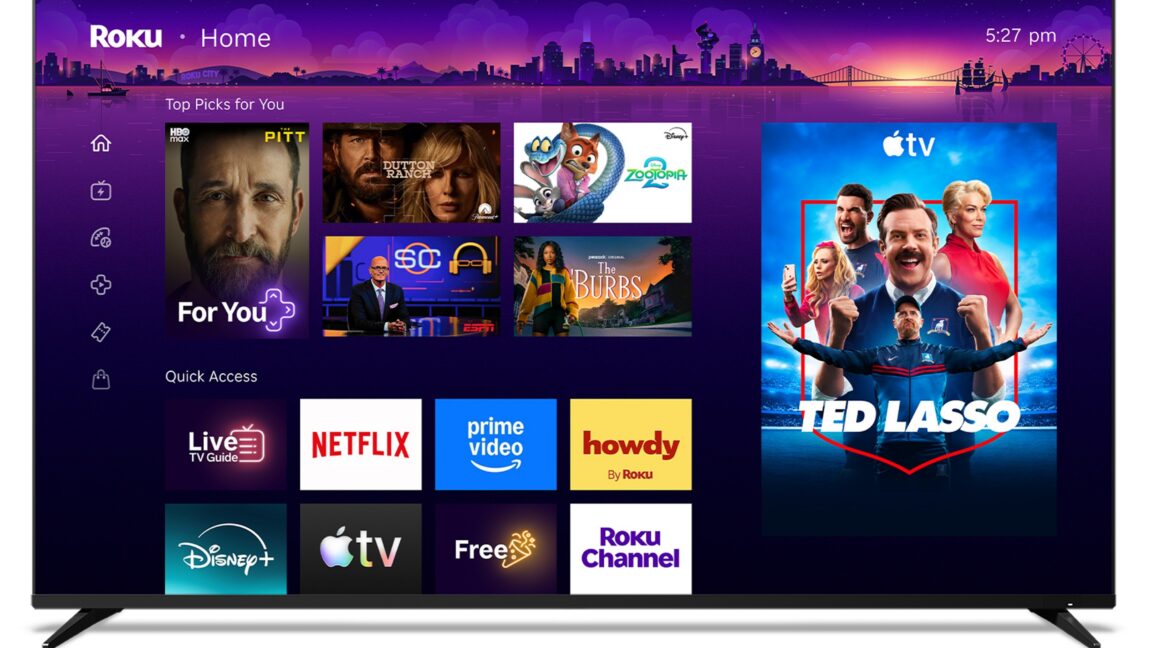
In some cases. There is a blank square on the main menu. The idle screen also normally had an ad. The idle screen looks like a scrolling cartoon panoramic shot of a street, and the ad is a billboard on the side of the street. That billboard simply isn’t there at all if the ad is blocked.


<laughs in pihole>
does the UI just render blank squares in that case?
Yes. It’s obnoxious.
I think it hides the big ad area if it can’t get the data, but I haven’t used my Roku outside of the setup in so long I don’t know what the UI would look like.
I’ve done this on VIDAA (Hisense) and there’s a placeholder for the homescreen ads that just say “VIDAA”.
In some cases. There is a blank square on the main menu. The idle screen also normally had an ad. The idle screen looks like a scrolling cartoon panoramic shot of a street, and the ad is a billboard on the side of the street. That billboard simply isn’t there at all if the ad is blocked.
On my parent’s it doesnt render anything at all. Just shows the wallpaper.
I use adguard on my opnsense with several lists… one of them snags it by default. the big blank border of a square is still lame.
deleted by creator
yo this looks like a good gist, thanks!
whoops! deleted it because it was posted elsewhere in the thread but i hadn’t noticed yet.
here it is in case anybody wants it. https://gist.github.com/sidward35/cea28bedd0ec0b1bceec8c2b22c163c4